


ReadManga-Manga/Comics/Webtoon
4.2547.00 Reviews
App Specs
- Version
- 1.2.0
- Updated On
- License
- Free
- Downloads
- 500,000+
- Developer
- DLXUYI
- Categories
- Comics
- Platform
- Android, iOS
Screenshots
 Analysis by AppCompare
I tend to judge a comics app by a practical question: can I find something worth reading, settle into it, and feel comfortable about the choices the app asks me to make along the way? ReadManga is aimed at readers who want manga, comics, and webtoons gathered in one place. My cautious take is that discovery and casual browsing are its clearest appeal, while readers who need detailed control over accounts, privacy, or a specific official catalog should take time to assess whether it suits them.
A useful place to start browsing
ReadManga is a free comics app from DLXUYI, released on November 3, 2024. Its current version is 1.1.8, and it runs on Android 7.0 and later. The app is rated Teen, so I would still use my own judgment about whether particular stories are appropriate for a younger reader; an age label is not a substitute for checking the content of a title.
Its audience figures suggest that it has found a meaningful readership: it has over 100,000 installs, an average rating of 4.4 from around 4,900 ratings, and 314 written reviews. Those figures are useful context, but they do not tell me whether the selection, reading tools, or trust controls will match an individual reader’s expectations. I would treat them as a reason to explore, not as a guarantee.
What I would check before settling in
Comics apps can involve several kinds of user choice: whether to create an account, whether to allow optional permissions, what information to share in public comments, and whether a purchase is worth making. I would look at each prompt as it appears rather than approving everything automatically. If ReadManga asks for access that seems unrelated to reading, I would pause and consider whether the app still works without it.
That approach is especially useful for anyone who plans to comment or rate series. A public reaction can reveal more about your tastes than a private reading session, so I would avoid including personal details in posts and check how visible a comment is before sharing it. I would also review the account and privacy controls available in the app before building a long-term reading routine around it.
Using ReadManga day to day
If you're anything like me, a good manga app is a must-have on your smartphone. I've recently dived into ReadManga, an app that promises to bring the world of manga, comics, and webtoons right to your fingertips. Let me walk you through my experience and what you can expect.
First Impressions
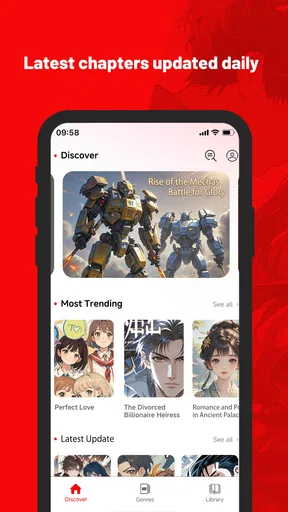
When I first opened the ReadManga app, I was greeted with a sleek and intuitive interface. It’s like they knew exactly what I was looking for—an app that's not only functional but also easy on the eyes. The main screen showcases a variety of manga genres, making it super easy to jump into whatever mood you're in.
Worth Reading Before You Choose

Flipboard Shows What News Apps Must Do Beyond the Feed

Switching to Android Auto Means Rethinking Your Driving Routine

Google Calendar Makes a Crowded Week Easier to Manage

Ludo King Makes the Most of the Minutes Between Plans

Baby Panda World Brings Quick Play to Modern Phones, but Its Game Library Feels Busy

ESPN’s Live Game View Makes Following Close Games Easier
Navigating around was a breeze. The developers have clearly put a lot of thought into making sure you can find your favorite titles without breaking a sweat. Whether you're into action-packed adventures or romantic tales, it’s all just a couple of taps away. I found myself getting lost in the app for hours, and honestly, I didn't mind at all.
Finding a story without endless scrolling
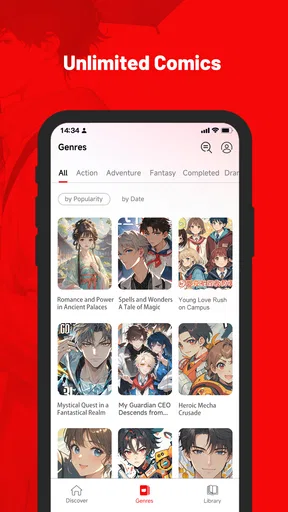
A large catalog is most useful when it helps me choose, rather than simply giving me more covers to pass. I would use the genre browsing as a starting point, then narrow my search by mood or reading time: a familiar series for a short break, or something new when I have a longer stretch. That small habit makes discovery feel intentional instead of turning a quick visit into a long session of scrolling.
For a reader who already follows a few series, I would keep a short mental list of what I want to return to and use recommendations as a second route, not the only route. Suggestions can be convenient, but they can also keep showing variations on what I already read. Switching between a known favorite and a genre I rarely choose is a better test of whether discovery is genuinely broad enough for me.
Features Galore
Now, let's talk about features. ReadManga offers an extensive library that covers a wide array of genres. From the latest trending series to beloved classics, the selection is impressive. The app also supports a variety of languages, which is a huge plus for non-English speakers.
One feature that really stood out to me was the personalized recommendation system. As you read more, the app starts to suggest titles based on your preferences. It’s like having a personal manga concierge, and who wouldn’t want that?
For those who prefer a more curated experience, the app also includes editor's picks and popular series lists. This makes it easy to discover new titles without feeling overwhelmed by the sheer volume of available manga.
How I would make recommendations work for me
Personalized suggestions are most useful after I have enough experience with an app to know whether its picks reflect my taste. I would sample a few different genres before drawing conclusions, rather than reading one type of story and expecting the recommendation feed to understand everything I like. If the suggestions start feeling repetitive, editor's picks and popular lists offer another path through the library.
I would also treat popularity as a discovery shortcut, not a quality verdict. A widely read series may be a good conversation starter, but it may not fit the mood I want that day. For someone trying the app during a commute or a lunch break, saving the decision for a calm moment can help avoid choosing a long story simply because it is prominent on the screen.
Reading Experience
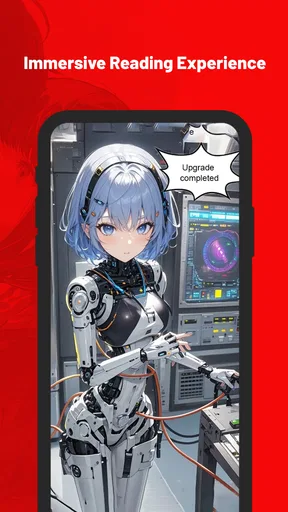
The reading experience on ReadManga is top-notch. The pages load quickly, and the quality of the images is fantastic. You can pinch to zoom, swipe to navigate, and even switch between horizontal and vertical reading modes. This flexibility is perfect for adapting to whatever reading style you prefer.
Another cool feature is the night mode, which is a lifesaver for late-night reading sessions. It’s easy on the eyes and doesn’t strain your vision—perfect for those "just one more chapter" moments that turn into hours of reading.
Matching the format to the moment
The choice between horizontal and vertical reading matters most when I change how I use my phone. A short webtoon session while standing in line suits a steady vertical scroll, while a more traditional page layout can feel better when I have a seat and want to pause over panel composition. Pinch-to-zoom is handy for dense artwork, but frequent zooming can interrupt the rhythm, so I would first try changing orientation or adjusting my grip before enlarging every panel.
For evening reading, night mode can make a bright screen less distracting, but I would still keep sessions comfortable and take breaks rather than treating a color setting as eye protection. In daylight, the opposite can be true: a darker interface may be harder to read in strong sun. The practical tip is to try the modes in the setting where you actually read, not just choose one once and assume it will suit every situation.
Everyday use and the trade-offs
A realistic routine might be opening ReadManga during a train ride, checking a familiar series, and then using a short wait at an appointment to sample a recommendation. The app’s mix of genres and reading orientations fits those changing pockets of time. I would avoid starting a complicated new story when I have only a few minutes, though; a quick browse can easily become a frustrating stop if I have not chosen something suitable to pick up and put down.
Compared with a single-publisher comics app, a broad discovery app can be more convenient when I want to browse across kinds of comics instead of staying within one catalog. The trade-off is that readers who care most about a particular publisher’s official releases, a consistent release schedule, or a carefully defined catalog may prefer that publisher’s own service. Compared with reading in a mobile browser, an app can make repeat visits feel more direct, but a browser may be preferable to someone who wants to avoid installing another app or keeping reading activity tied to an app account.
Community and Interaction
What makes ReadManga really engaging is the community aspect. You can leave comments, rate series, and engage with other manga enthusiasts. It’s a great way to share your thoughts and get different perspectives on the stories you're reading.
The app also includes forums and discussion boards where you can dive into deeper conversations about storylines, character development, and upcoming releases. It’s a vibrant space that adds another layer of enjoyment to the reading experience.
Keeping participation comfortable
Comments and discussion boards can make a story more enjoyable, especially when I want to compare interpretations after a surprising chapter. They also create a spoiler risk. I would check the surrounding conversation before reading it, and avoid opening a discussion until I have caught up if the series is important to me. When posting, I would keep the point focused on the story and leave out identifying details that do not help the discussion.
Community tools are optional in practice: a reader can value the catalog and reading controls without joining every conversation. If ratings or comments start to shape my choices too strongly, I would return to browsing by genre or following my own interests. That keeps other readers’ enthusiasm useful without letting it decide what I should enjoy.
Costs, access, and who should look elsewhere
ReadManga is free to install, with in-app purchases priced from $1.80 to $17.99 per item. I would use the app for a while before spending anything, then inspect the purchase screen carefully so I understand what a particular item provides and whether it is a one-off choice. A free download does not mean every possible use inside the app is free, so readers who need a completely no-cost experience should be cautious about any paid prompts.
The app is a better fit for curious readers who like exploring different genres, switching between manga and webtoon-style reading, and using community discussion when it adds something. It is less suitable for someone who wants a tightly controlled, publisher-specific collection or who prefers not to interact with comments, accounts, or purchase prompts at all. If my main concern is privacy, I would inspect the visible permission and account choices first and decide whether the available controls feel adequate before making it part of my daily routine.
Final Thoughts
In conclusion, ReadManga is a fantastic app for any manga lover. With its extensive library, user-friendly interface, and engaging community features, it’s hard not to recommend it. The app delivers on its promise to bring manga, comics, and webtoons to life in a way that’s both accessible and enjoyable.
If you’re on the hunt for a new manga app or looking to switch things up, give ReadManga a try. You might just find your next favorite series waiting for you. Happy reading!
My cautious verdict
I would try ReadManga as a discovery-focused reading app, especially if I enjoy browsing across genres and want both vertical and horizontal reading options. Before committing, I would test a few titles, see whether recommendations remain varied, and check the account, permissions, and purchase choices that appear during ordinary use. That gives me a clearer sense of fit than relying on a popularity score alone.
For me, the strongest reason to give it a chance is the combination of browsing, reading flexibility, and discussion in one place. The main reason to hesitate is that those strengths do not automatically answer every reader’s concerns about catalog preferences, spending, or personal controls. If those details matter to you, take a measured look before making it your regular comics app; if you simply want an easy way to explore manga and webtoons, it is a reasonable place to begin.
Pros
- Wide variety of manga genres available.
- User-friendly interface with smooth navigation.
- Offline reading mode for convenience.
- Regular updates with new chapters.
- High-quality images enhance reading experience.
Cons
- Ads can be intrusive at times.
- Limited language options available.
- Requires a stable internet connection.
- Occasional crashes on older devices.
- Some titles lack complete series.
FAQs for ReadManga-Manga/Comics/Webtoon
What features does ReadManga offer for manga and comics enthusiasts?
ReadManga provides a vast library of manga, comics, and webtoons across various genres. Users can enjoy features like offline reading, customizable reading modes, and notifications for new chapter releases. The app also includes a bookmark option to save your place, and personalized recommendations based on your reading habits.
Is ReadManga available for both Android and iOS devices?
Yes, ReadManga is available for download on both Android and iOS platforms. The app is optimized for a seamless reading experience on smartphones and tablets, ensuring that users can enjoy their favorite comics and manga on any device. Links to download the app are provided for convenience.
Does ReadManga require a subscription to access content?
ReadManga offers both free and premium content. While many manga and comics are available for free, a subscription may be required for accessing exclusive series, ad-free reading, and additional features. Users can choose a subscription plan that best suits their needs, with the option to cancel anytime.
How often is new content added to ReadManga?
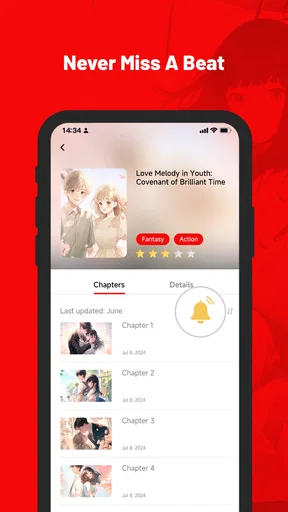
New content is added to ReadManga regularly, with updates often occurring weekly or even daily. The app notifies users of new chapter releases and updates to their favorite series, ensuring readers are always informed and can stay up-to-date with the latest developments in their chosen stories.
Can I read manga offline using ReadManga?
Yes, ReadManga allows users to download manga and comics for offline reading. This feature is particularly useful for readers who may have limited internet access or who prefer to read on the go without using data. Simply download the chapters you want to read offline, and access them anytime, anywhere.


